Quick answer
- For the web, AR and real-time apps: GLB.
- For 3D printing: STL (or 3MF if your slicer supports it).
- For sending exact parts to engineers and manufacturers: STEP.
- For moving rigged, animated characters between tools: FBX, then GLB for the web.
- For simple, widely supported static meshes: OBJ.
Side by side
| Format | Geometry | Materials | Animation | Best for |
|---|---|---|---|---|
| GLB | Triangles + scene | PBR, textures inside | Yes | Web, AR, games |
| glTF | Triangles + scene | PBR, textures beside | Yes | Web pipelines, inspection |
| FBX | Triangles + scene | Yes | Yes | Content tools, game engines |
| OBJ | Triangles or polygons | Basic, via .mtl | No | Simple static exchange |
| STL | Triangles only | No | No | 3D printing |
| STEP | Exact solids | Colours | No | CAD and manufacturing |
glTF and GLB are the same format
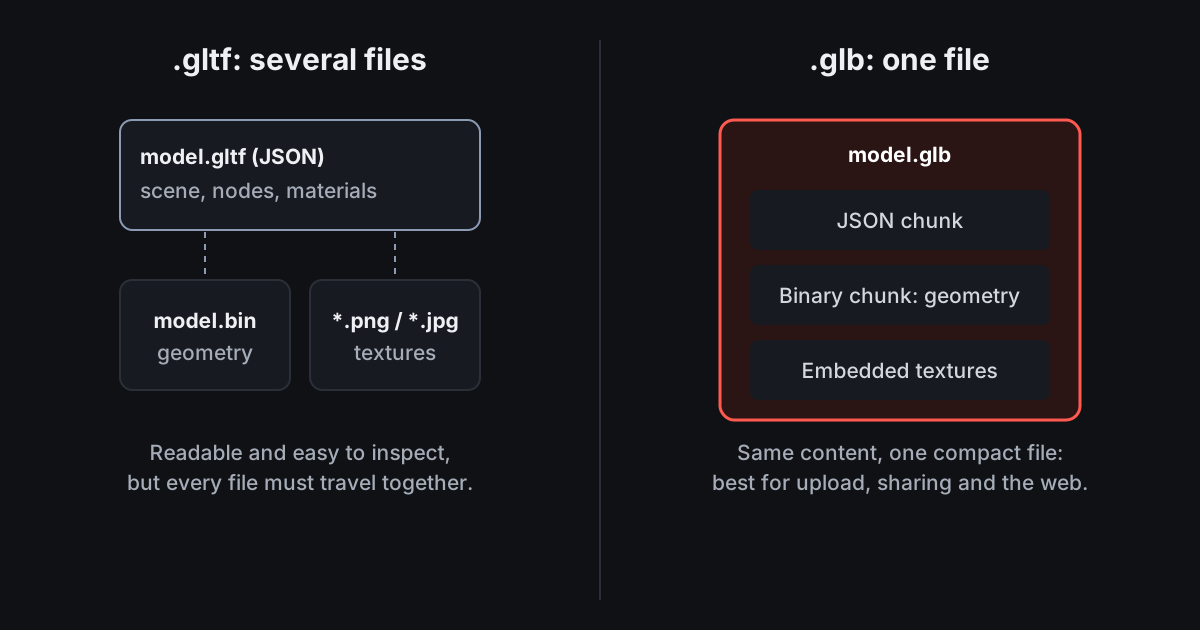
glTF 2.0 is the Khronos open standard for 3D on the web. A .gltf is readable JSON that points to a .bin file and texture images. A .glb packs exactly the same content into one binary file, which is why GLB is easier to upload and share. Both use metres and Y up.
STL is only geometry
STL stores triangles and nothing else: no units, no colours, no parts, no history. That simplicity is why every slicer reads it. It is also why STL is a poor format for anything you will need to change precisely later.
STEP is the engineering format
STEP (ISO 10303, .step or .stp) stores exact solids rather than triangles, plus units and part structure. Send STEP to machine shops and other CAD users. Convert it to STL for printing or GLB for the web.
Converting between formats in VIZON
VIZON opens STEP, STP, STL, GLB, glTF and FBX. CAD parts export as STEP, STL or GLB; mesh models download as GLB; Studio exports any saved model as GLB, glTF or STL. That covers STEP to STL, STEP to GLB, STL to GLB, FBX to GLB and GLB to STL.