
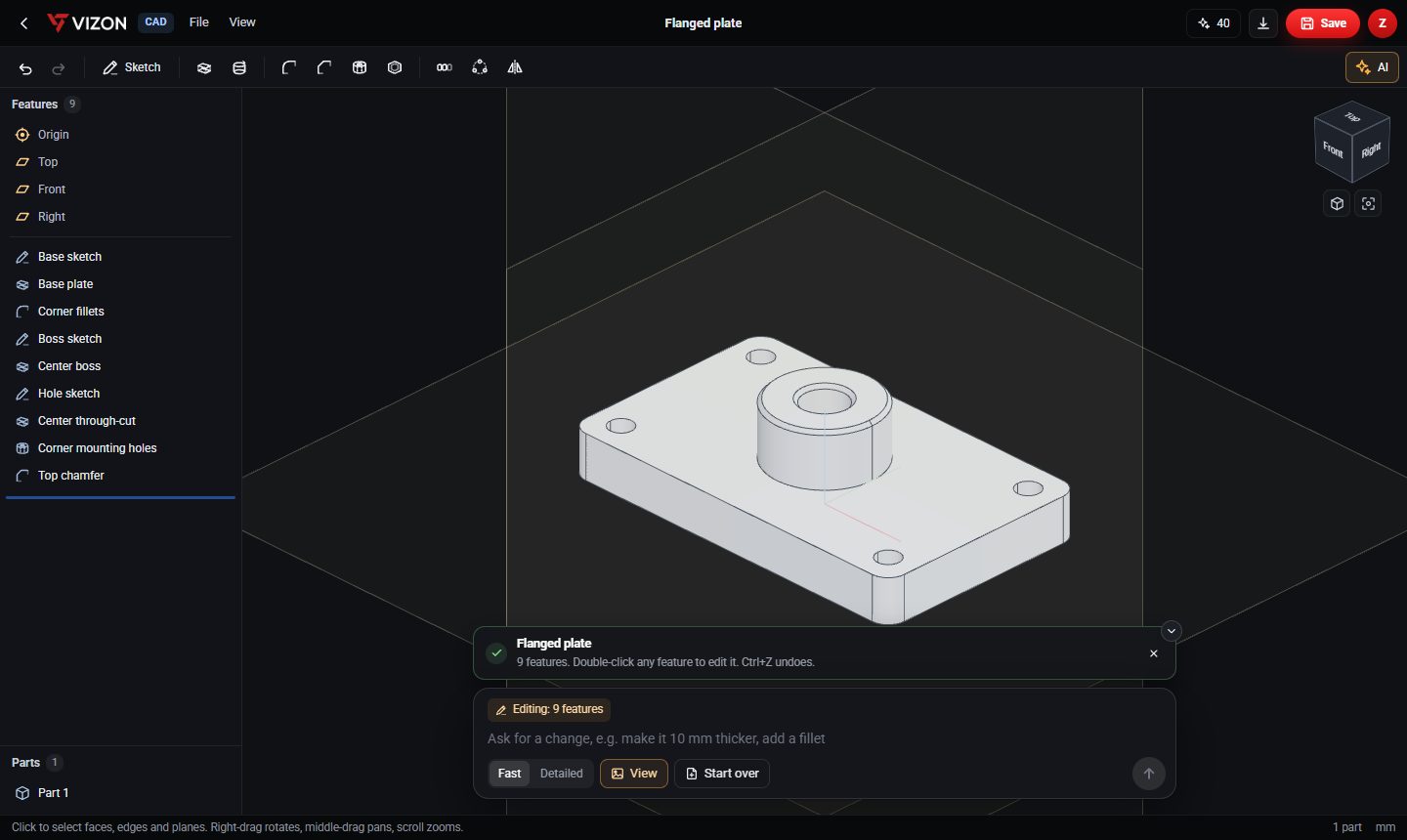
What the AI actually produces
In VIZON the AI does not output a mesh. It writes a parametric feature list: sketches, extrudes, holes, fillets, chamfers and patterns, exactly as if you had built the part yourself. That is why you can keep editing it.
Write the prompt like a drawing note
- Start with the base shape and its overall sizes in millimetres.
- Then list the features: holes and their diameters, bosses, slots, fillets, chamfers.
- Say where things go: centred, offset from an edge, on a bolt circle.
- Use patterns for repeated features rather than describing each copy.
Pick a mode
Fast suits simple parts and small edits. Detailed takes longer and suits parts with more features. You can attach up to four reference images when creating a new part.
Check the feature list
After generating, read the feature names: they describe what each step does, such as "Base plate", "Corner fillets" or "Corner mounting holes". If a feature failed to build, VIZON shows the reason and tries one automatic repair.
Refine by asking, or by hand
Ask for one change at a time, like "make the boss 5 mm taller". The AI sees your current view and edits the existing features. Or double-click a feature and change the number yourself; both approaches keep the history intact.
Export
Save the part, then export STEP for other CAD tools, or STL for 3D printing.